WRL Companion
A browser extension for World Radio League: QRZ.com lookups, worked-park/state tracking, a bearing-sorted spot panel, license-class frequency filtering, quick bookmarks, and a one-click LoTW → QRZ Logbook import.
What it does
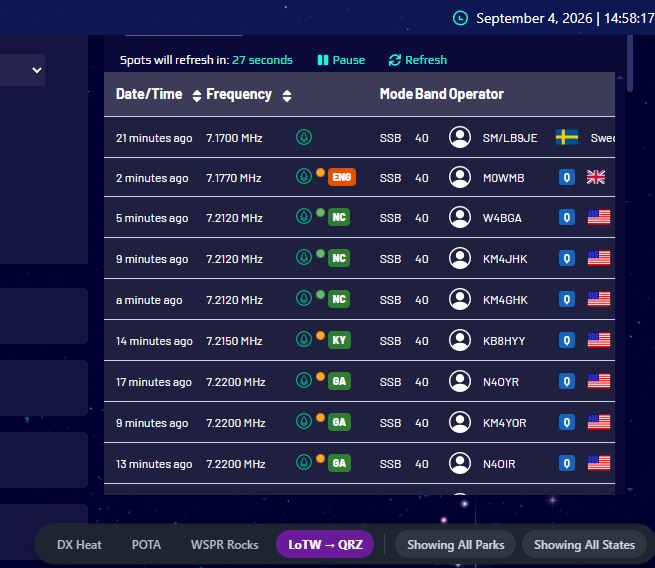
On the spot list
- Adds a "Q" QRZ.com lookup link next to every callsign on the page
- A colored dot on each POTA spot: green = you've already worked that park, orange = it's new to you
- A colored state badge next to the dot: OH worked before, D a state you haven't worked yet
- Hover the dot or state badge for a combined tooltip — park status, state status, and the compass bearing from your home station
- Click the dot to jump straight to that park's page on pota.app
- Rows already logged today (WRL's own native tracking) keep WRL's own green highlight, untouched
- Out-of-privilege spots get a red row highlight automatically, based on your saved license class
- When searching "Their Park" while logging a contact, the state (or country) is shown right next to each search result automatically
The action bar (bottom-right, dark pill dock)
- DX Heat POTA — quick bookmark links
- LoTW → QRZ — one-click import, see below
- Showing/Hiding Worked Parks and Showing/Hiding Worked States — filter already-worked spots out of the list
- Showing/Hiding Out-of-Privilege — filter out spots on frequencies your license class can't use
The Bearings panel
- Click "Bearings" in the action bar to open a compact, collapsible panel (click the header to collapse/expand) listing every POTA spot on the page sorted nearest-to-farthest by compass bearing from your station
- Each line shows callsign, frequency, park reference, and bearing — the park reference is green if worked, orange if not
- Rows logged today get the same bright green background as WRL's own "logged" rows
- Click any entry: it scrolls to and outlines the real row in gold, and automatically tries to load it into your logging screen for you
- The entry you last selected stays outlined in the panel too, so you can find your place again
LoTW → QRZ Logbook import
- Opens QRZ Logbook in a background tab (WRL stays in front) and runs the import automatically
- The button turns red and pulses while it works
- A results popup appears above the action bar when it's done, and the QRZ tab closes itself automatically (configurable)
1 Download the extension
Grab the zip file below and unzip it into its own folder on your computer.
Download WRL Companion2 Load it into Chrome
Open a new tab and go to chrome://extensions
Turn on Developer mode (toggle in the top-right corner).
Click Load unpacked, then select the unzipped wrl-companion folder.
3 Sync your POTA worked-parks data
Open pota.app in a tab and make sure you're logged in.
Just leave that tab open for a few seconds — the extension quietly grabs your worked-parks and worked-states list in the background. No setup needed.
4 Set your license class (optional)
chrome://extensions → WRL Companion → Details → Extension options → set "Your US License Class" (Technician, General, or Extra) → Save.
This powers the red out-of-privilege highlighting and the "Hiding Out-of-Privilege" filter toggle, using standard FCC Part 97 HF band privileges.
5 Set up LoTW → QRZ import (optional)
On that same Extension options page: enter your LoTW password and click Save. Your LoTW username doesn't need to be entered here — it's already set on QRZ's own side, under QRZ Settings → LoTW Access page.
By default the QRZ tab closes itself automatically once the import finishes — uncheck the box on the settings page if you'd rather review the full details on QRZ's own page instead.
6 Go spot!
Open your World Radio League spotting page. Within a few seconds you should see the layout shown in the screenshot above.
Troubleshooting
Dots staying grey? Make sure a pota.app tab is (or recently was) open while logged in — the sync only runs there.
LoTW import saying username/password incorrect? Double check the password saved in the extension's settings page, and confirm your LoTW username is still correct under QRZ's own Settings → LoTW Access page.
License privilege colors look off? The band-privilege table is built from general Part 97.301 knowledge, not a live FCC lookup — let me know the specific band/mode combo and it can be corrected.
Nothing showing at all? Double-check the extension is enabled at chrome://extensions, and try reloading it (circular arrow icon) plus refreshing the WRL page.